Reporting Ecosystem
Reporting Ecosystem
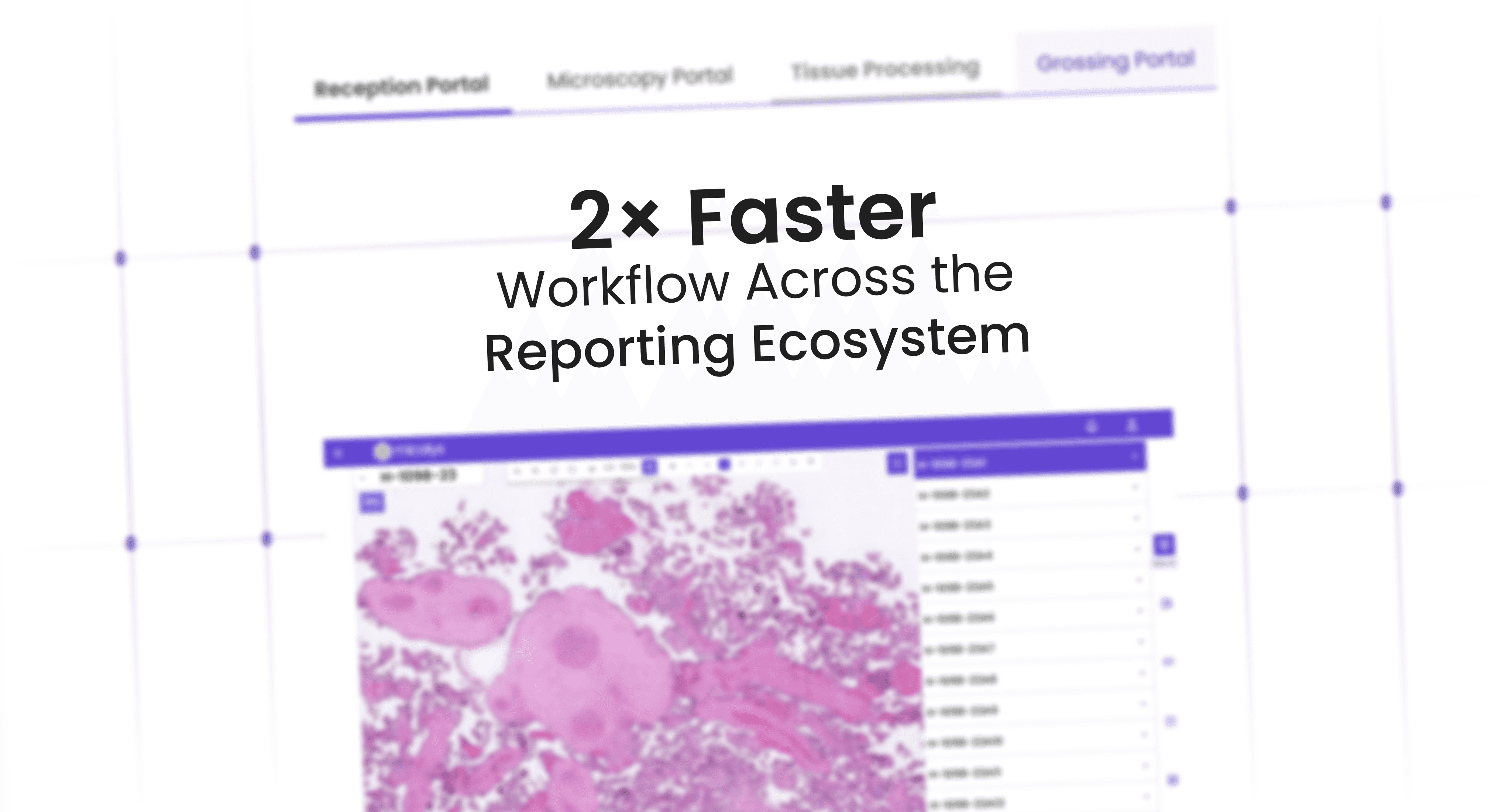
Translating complex medical workflows into
Streamlined, role-based reporting system that enhances clarity, reduces friction, and scales across diverse lab environments.
Translating complex medical workflows into-
Streamlined, role-based reporting system that enhances clarity, reduces friction, and scales across diverse lab environments.
OVERVIEW
OVERVIEW
This project focused on designing an end-to-end platform that streamlines every stage of the pathology lab journey—from patient intake and sample tracking to diagnostics and final reporting. The system was built to be responsive across various screen types, ensuring usability for different users—from receptionists on desktops to lab technicians on tablets. With role-based access, dynamic tools like a custom form builder, and modular workflows, the platform brings clarity, efficiency, and scalability to labs of all sizes.
INDUSTRY
Healthcare & Medical Diagnostics
USERS
Healthcare Professionals
CATEORY
Product Design
USER
Healthcare Professionals
CATEOGRY
Product Design
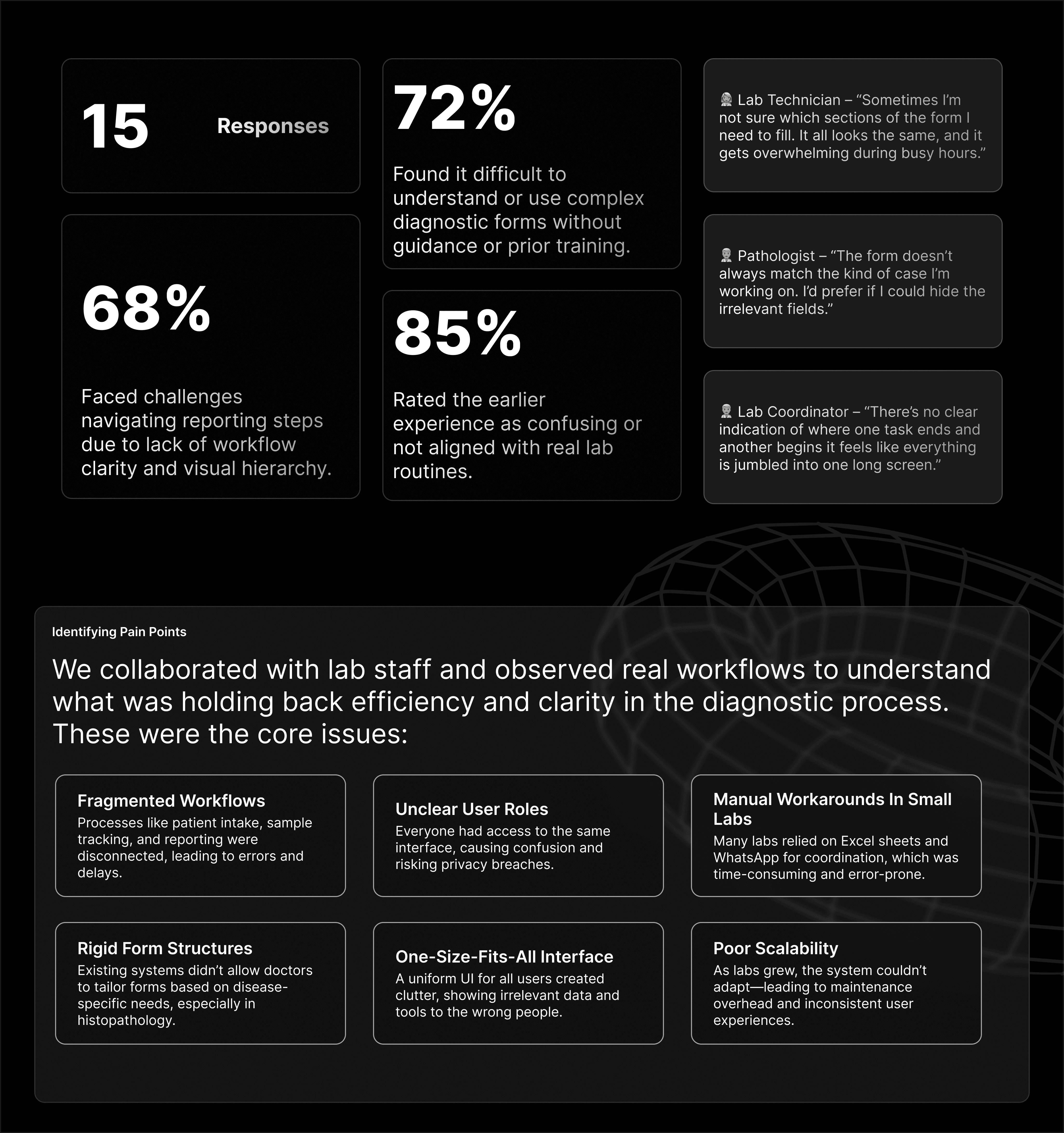
GOALS
GOALS
Focusing on clarity, adaptability, and streamlined operations, a design that unifies a platform that evolves with the needs of modern pathology labs.
Focusing on clarity, adaptability, and streamlined operations, a design that unifies a platform that evolves with the needs of modern pathology labs.
Focusing on clarity, adaptability, and streamlined operations, a design that unifies a platform that evolves with the needs of modern pathology labs.
Streamline the Workflow
Streamline the Workflow
Streamline the Workflow
Design an end-to-end system that connects every stage—from patient intake to final report—reducing manual steps and improving operational flow
Design an end-to-end system that connects every stage—from patient intake to final report—reducing manual steps and improving operational flow
Enable Role-Based Access
Enable Role-Based Access
Enable Role-Based Access
Create tailored interfaces for different user roles to reduce confusion, minimize errors, and ensure data privacy.
Create tailored interfaces for different user roles to reduce confusion, minimize errors, and ensure data privacy.
Support Scalability Across Labs
Support Scalability Across Labs
Support Scalability Across Labs
Build a flexible platform that works seamlessly for both small clinics and large diagnostic labs, with responsive design for varied screen types.
Build a flexible platform that works seamlessly for both small clinics and large diagnostic labs, with responsive design for varied screen types.
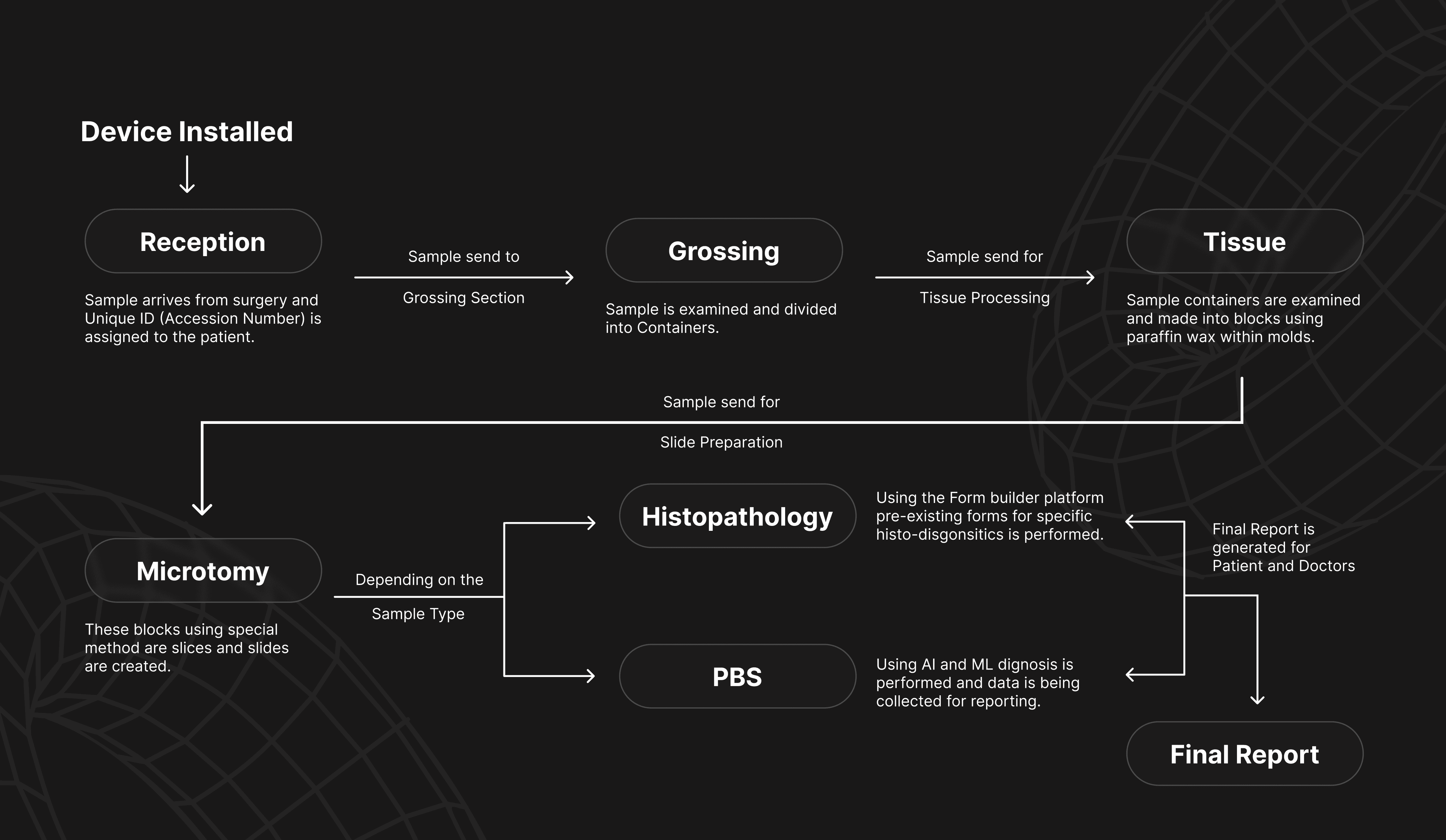
USER FLOW
USER FLOW
WIREFRAME
WIREFRAME
Heads up: Videos might load in lower quality by default. If things look a bit blurry, try bumping up the resolution manually for the best experience.
Heads up: Videos might load in lower quality by default. If things look a bit blurry, try bumping up the resolution manually for the best experience.
DESIGN SYSTEM
DESIGN SYSTEM
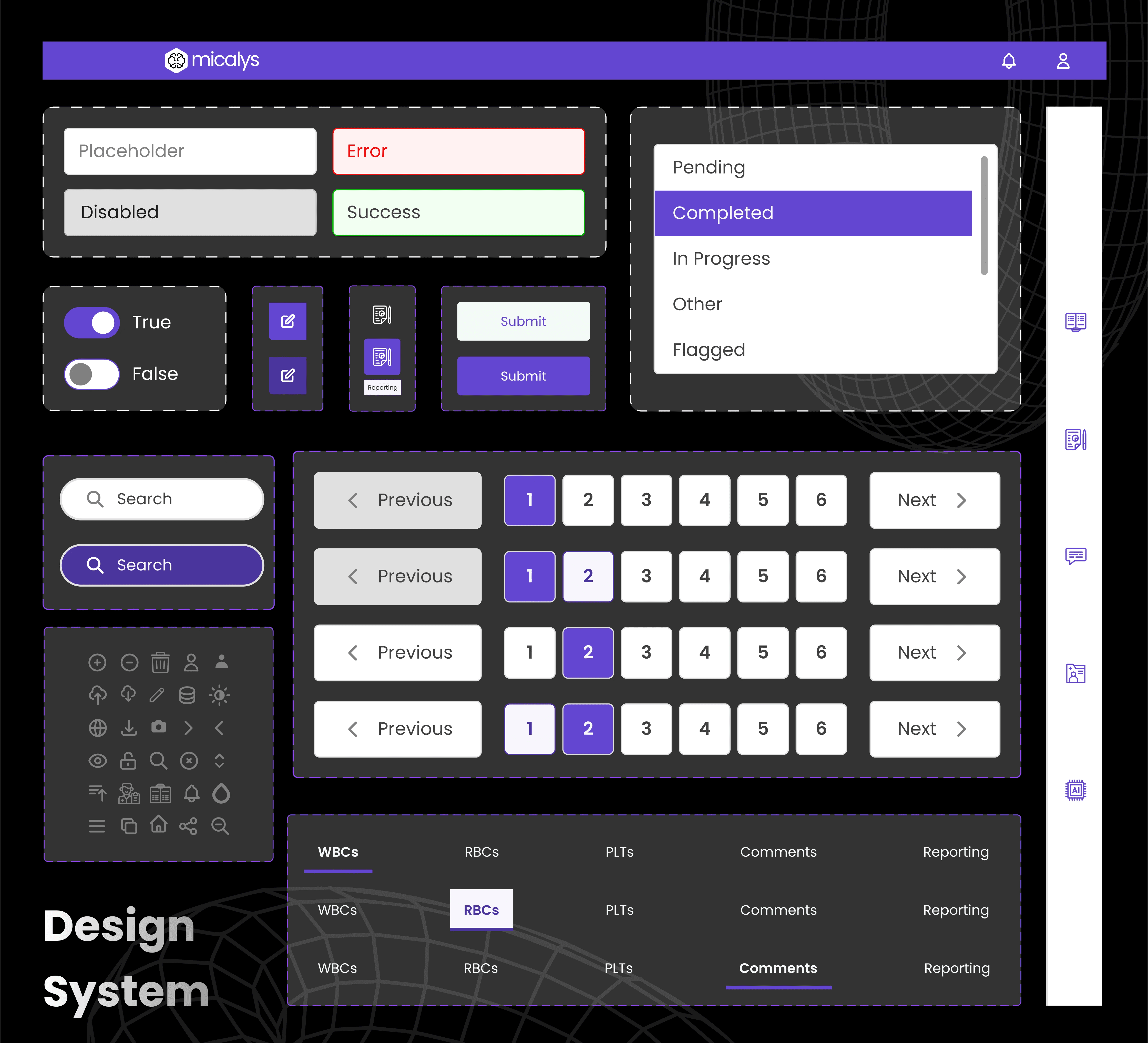
Bringing it all together, the final design streamlines complex workflows into an intuitive, role-based interface tailored for every user in the diagnostic journey.
Bringing it all together, the final design streamlines complex workflows into an intuitive, role-based interface tailored for every user in the diagnostic journey.
Bringing it all together, the final design streamlines complex workflows into an intuitive, role-based interface tailored for every user in the diagnostic journey.
FINAL DESIGN
FINAL DESIGN
The following outlines the different workflow portals users engage with throughout the reporting process.
Installing Device
Designed for a seamless start, the install page ensures device readiness with guided setup and minimal manual intervention.
Step-by-step onboarding
Clear instructions walk lab staff through device calibration and system checks to ensure a smooth installation process.
Customizable settings
Technicians set up lab-specific preferences such as department naming, role access, and data flow routing.
System Status Overview
Live indicators confirm device status, helping users troubleshoot quickly.
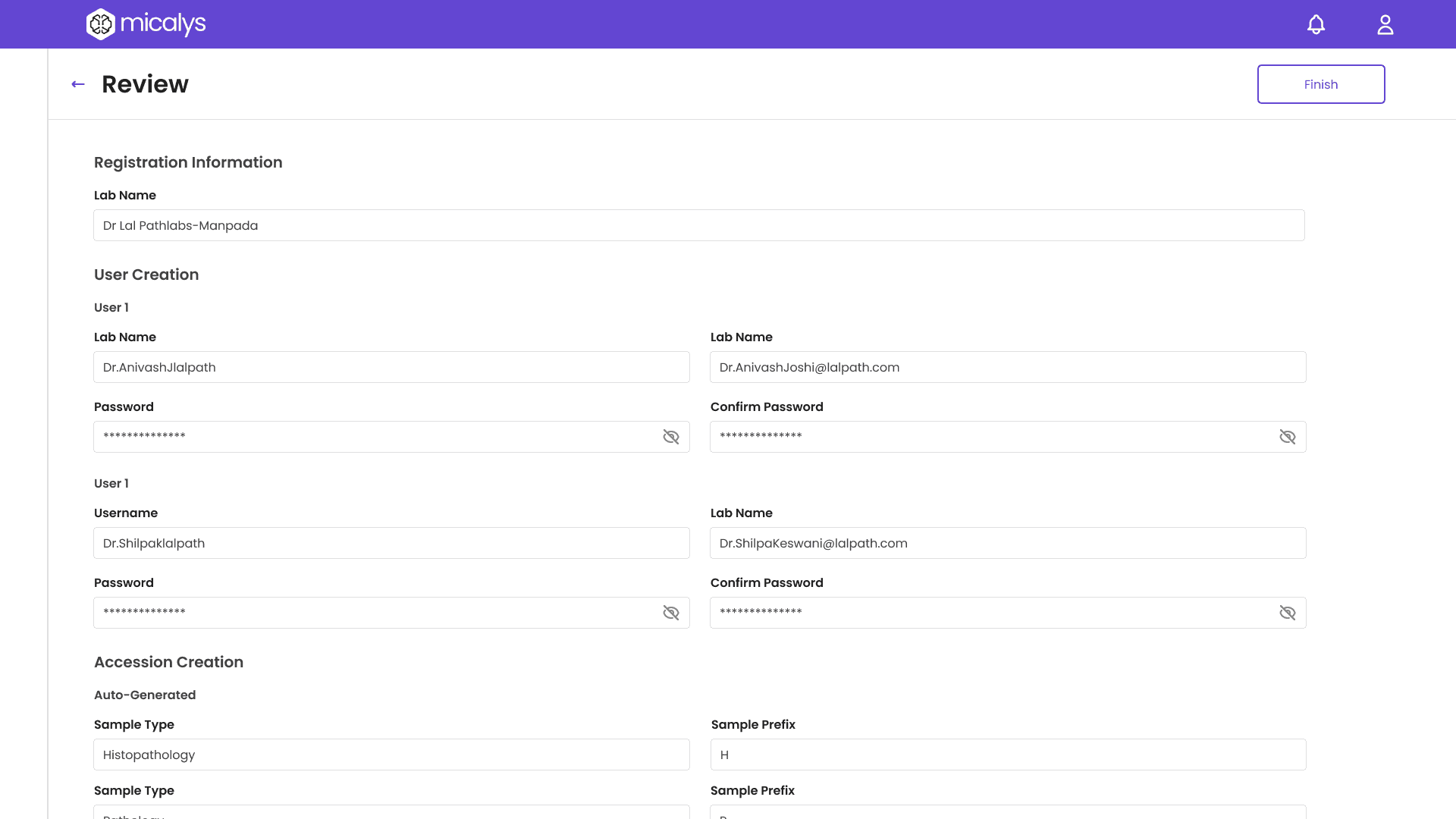
Admin Portal
Turning samples into structured blocks
User & Role Management
Admins can create, assign, and manage user roles—from receptionists to pathologists—ensuring secure, role-based access across the system.
Custom-fit for every lab
Set up lab-specific workflows, such as approval hierarchies, reporting formats, and slide review steps to mirror real-world practices.
Dashboard & Reports
Gain visibility into system activity with real-time dashboards, lab usage analytics, and reporting summaries for better decision-making.
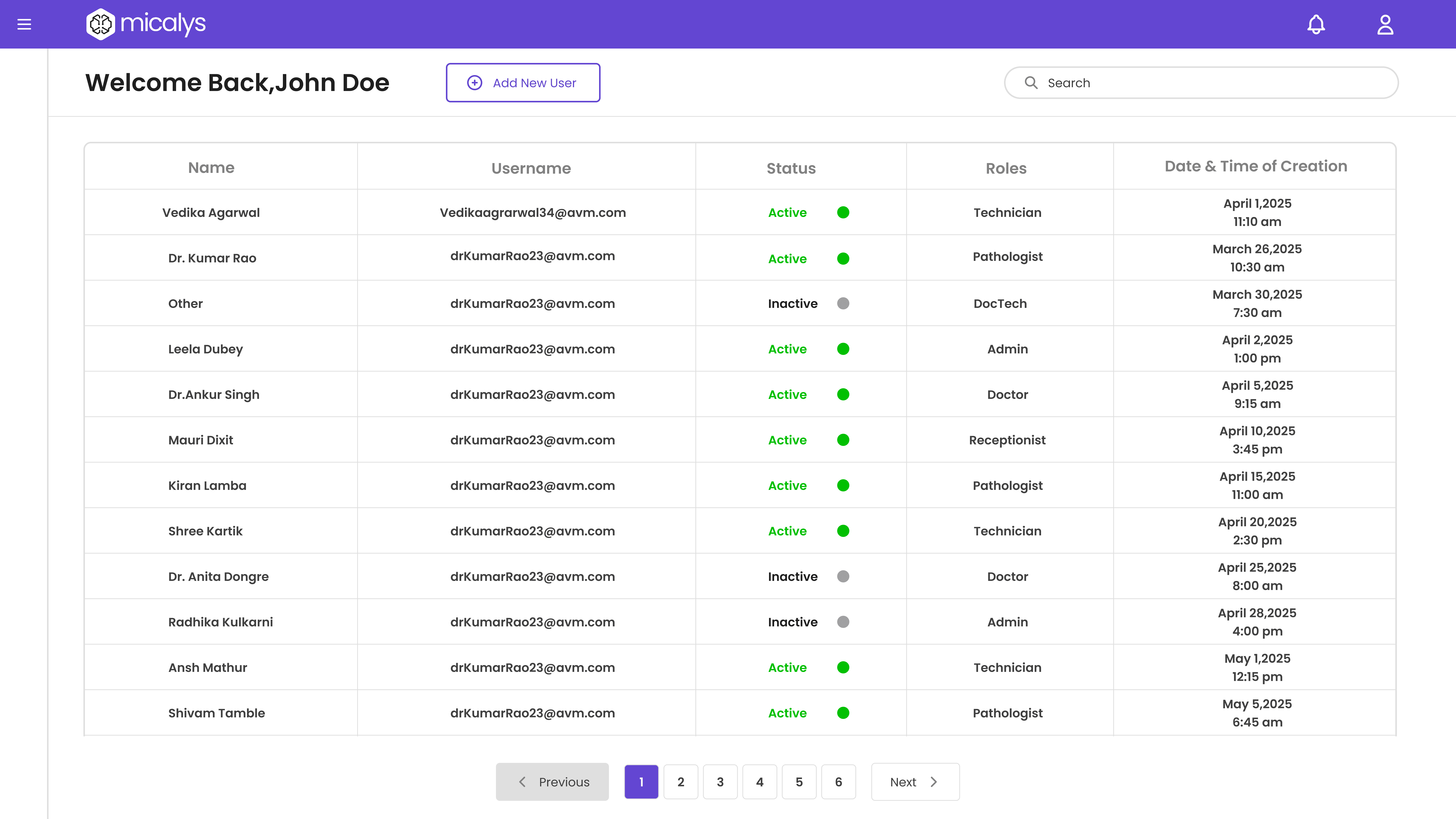
Reception Portal
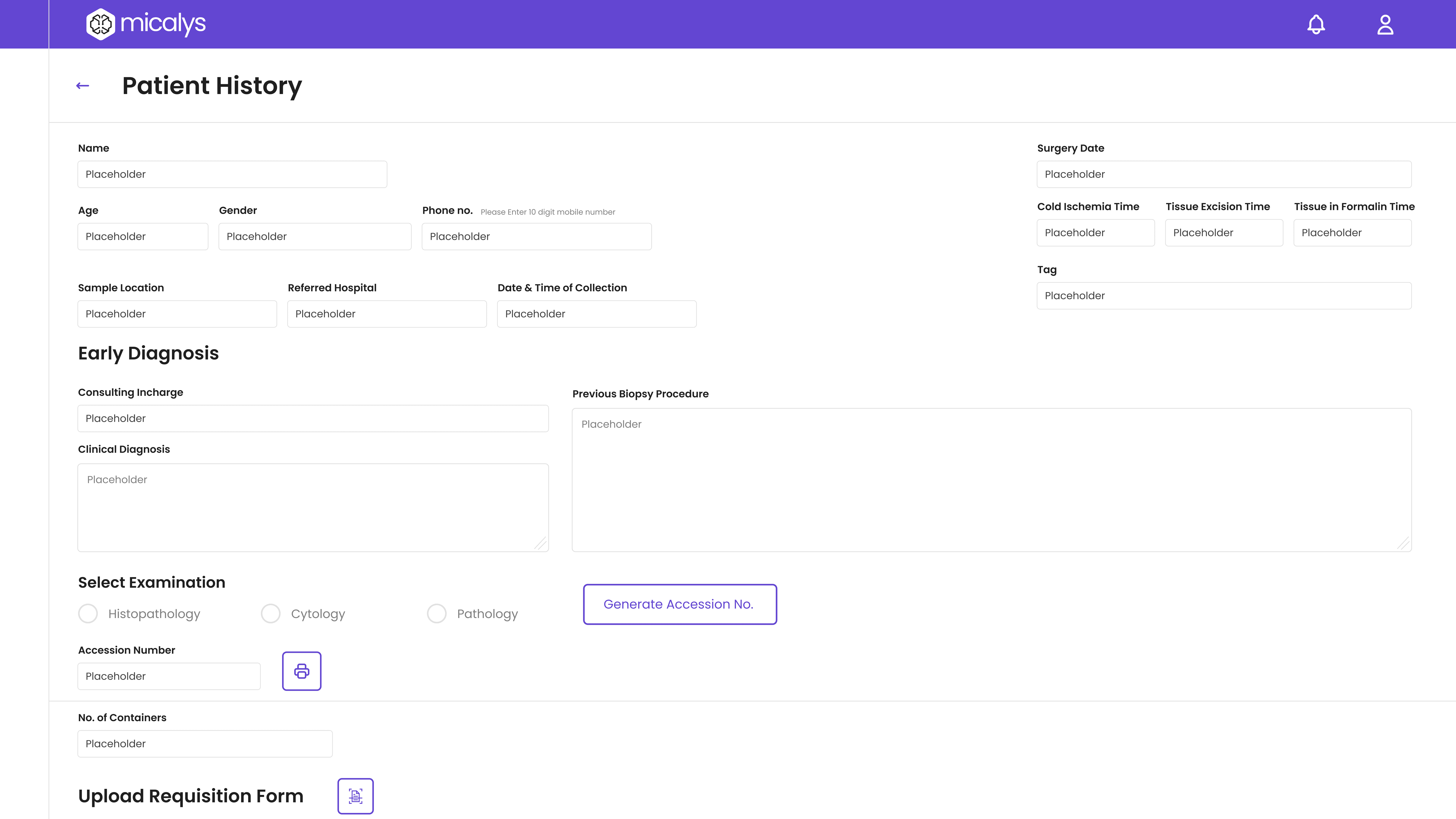
The Reception Module serves as the entry point capturing patient and sample data with clarity and ensuring smooth case initiation.
Patient Registration
Receptionists can quickly enter patient demographics and medical history, reducing errors through form validation and auto-suggestions.
Unique case tracking
Each sample is tagged with a system-generated accession number that links it to the patient case, ensuring traceability throughout the lab journey.
Sample Logging & Categorization
Depending on the sample type (Histopathology, PBS, etc.), the system assigns the correct workflow path, enabling seamless downstream processing.
Grossing Portal
The Grossing enables lab technicians to inspect and segment samples accurately, forming the foundation for downstream processing.
Ensuring the right sample every time
Technicians verify container labels and accession numbers, confirming sample type and patient case before initiating grossing.
Cassette Mapping
Each sample is examined and divided into cassettes based on tissue type or diagnostic need, with digital mapping to maintain traceability.
Documenting critical observations
Technicians can log textual notes and capture reference images during grossing, which are stored alongside the case for future reference.
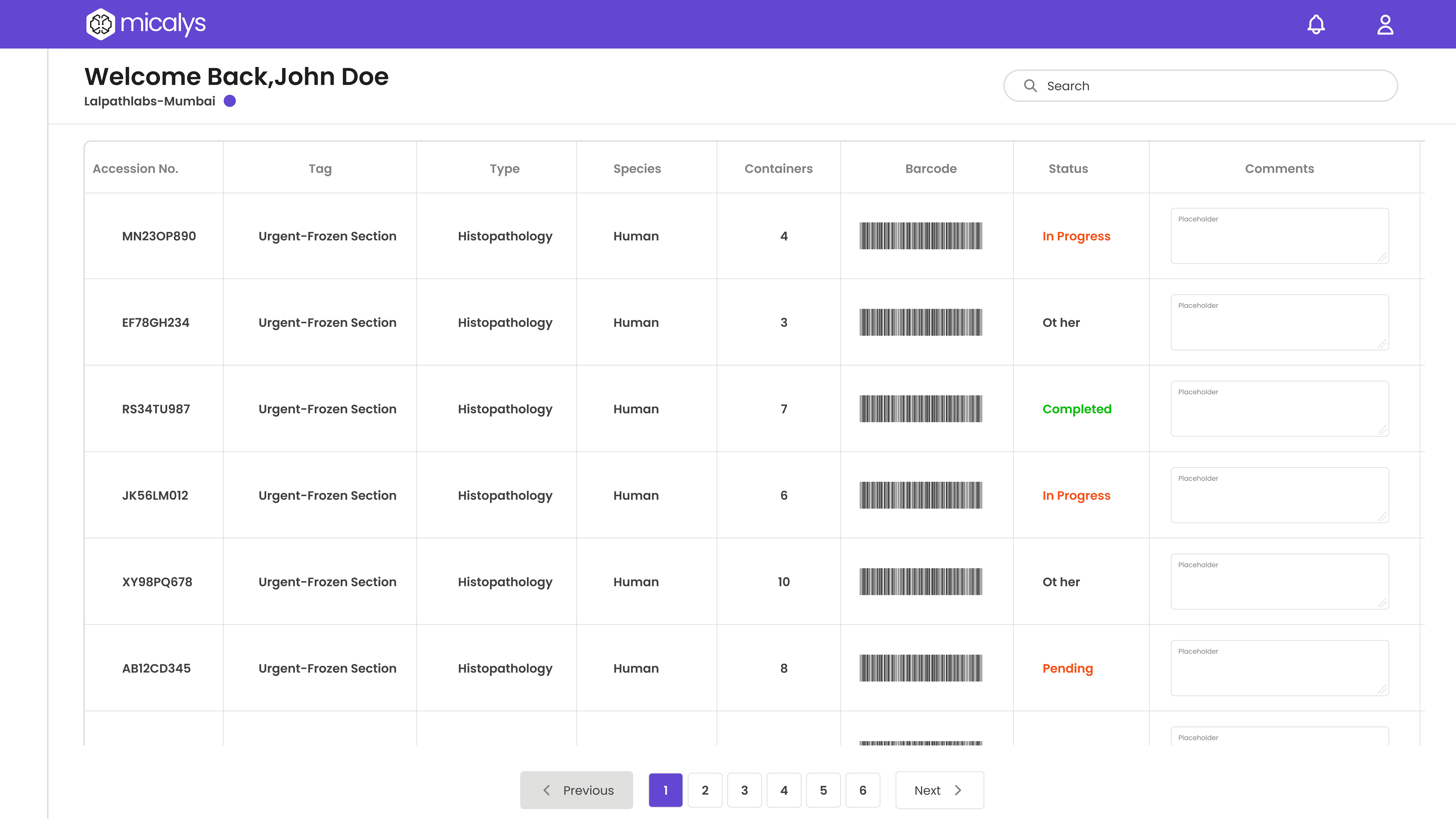
Tissue Processing Portal
In tissue processing, the transformation of soft tissue samples into paraffin blocks is an essential step for precise slicing and diagnosis.
Turning samples into structured blocks
Tissue samples are carefully embedded into paraffin wax within molds, creating standardized blocks ready for sectioning.
Sample-to-Block Mapping
Each block is digitally mapped to its corresponding cassette and patient ID, maintaining an unbroken data chain for the case.
Block Storage & Handover
Completed blocks are stored with timestamps and handed over to the microtomy unit, with digital logs ensuring readiness and priority tagging.
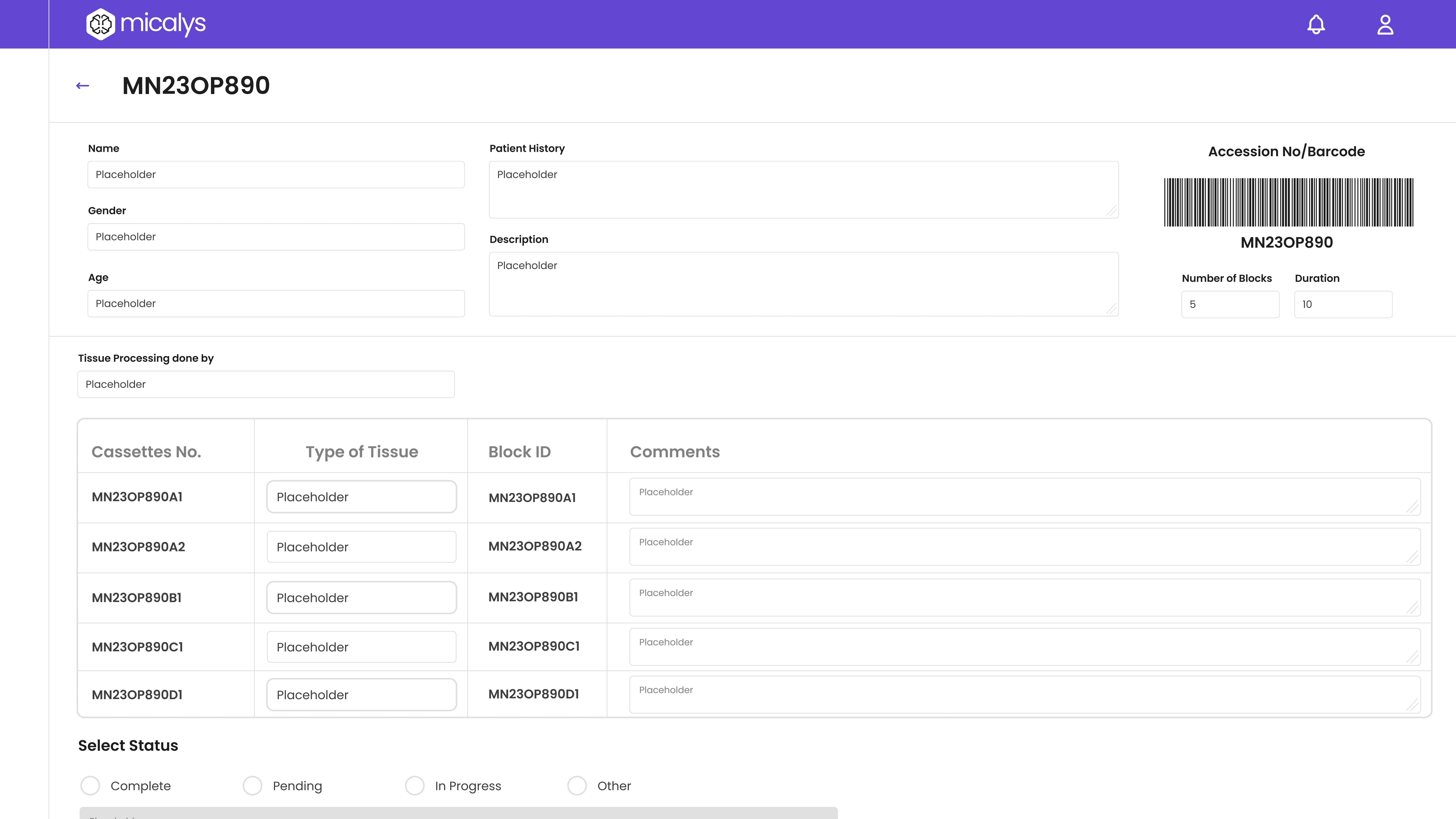
Microtomy Portal
Microtomy enables the precise slicing of paraffin blocks into thin sections, which are then mounted on slides, crucial for microscopic examination.
Sectioning of Paraffin Blocks
Technicians use microtomes to cut ultra-thin tissue sections from each block, ensuring consistency and clarity under the microscope.
Slide Preparation & Labeling
Each slice is mounted onto a glass slide, stained appropriately, and labelled with the unique accession number for identification.
Slide Handover to Pathologist
Prepared slides are digitally tracked and sent to the pathologist, triggering a case-ready status in the system for further review.
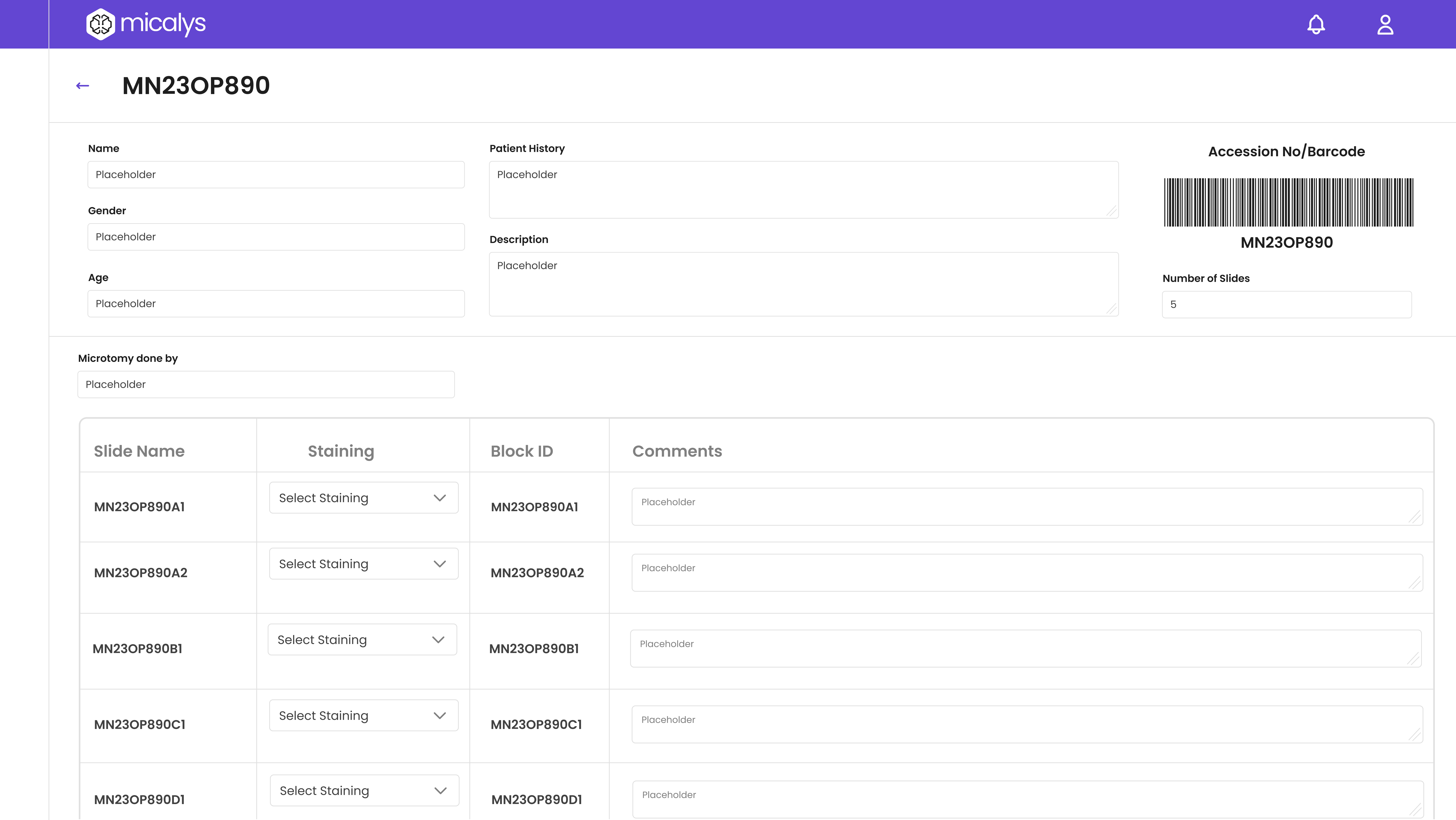
Installing Device
Designed for a seamless start, the install page ensures device readiness with guided setup and minimal manual intervention.
Step-by-step onboarding
Clear instructions walk lab staff through device calibration and system checks to ensure a smooth installation process.
Customizable settings
Technicians set up lab-specific preferences such as department naming, role access, and data flow routing.
System Status Overview
Live indicators confirm device status, helping users troubleshoot quickly.
Admin Portal
Turning samples into structured blocks
User & Role Management
Admins can create, assign, and manage user roles—from receptionists to pathologists—ensuring secure, role-based access across the system.
Custom-fit for every lab
Set up lab-specific workflows, such as approval hierarchies, reporting formats, and slide review steps to mirror real-world practices.
Dashboard & Reports
Gain visibility into system activity with real-time dashboards, lab usage analytics, and reporting summaries for better decision-making.
Reception Portal
The Reception Module serves as the entry point capturing patient and sample data with clarity and ensuring smooth case initiation.
Patient Registration
Receptionists can quickly enter patient demographics and medical history, reducing errors through form validation and auto-suggestions.
Unique case tracking
Each sample is tagged with a system-generated accession number that links it to the patient case, ensuring traceability throughout the lab journey.
Sample Logging & Categorization
Depending on the sample type (Histopathology, PBS, etc.), the system assigns the correct workflow path, enabling seamless downstream processing.
Grossing Portal
The Grossing enables lab technicians to inspect and segment samples accurately, forming the foundation for downstream processing.
Ensuring the right sample every time
Technicians verify container labels and accession numbers, confirming sample type and patient case before initiating grossing.
Cassette Mapping
Each sample is examined and divided into cassettes based on tissue type or diagnostic need, with digital mapping to maintain traceability.
Documenting critical observations
Technicians can log textual notes and capture reference images during grossing, which are stored alongside the case for future reference.
Tissue Processing Portal
In tissue processing, the transformation of soft tissue samples into paraffin blocks is an essential step for precise slicing and diagnosis.
Turning samples into structured blocks
Tissue samples are carefully embedded into paraffin wax within molds, creating standardized blocks ready for sectioning.
Sample-to-Block Mapping
Each block is digitally mapped to its corresponding cassette and patient ID, maintaining an unbroken data chain for the case.
Block Storage & Handover
Completed blocks are stored with timestamps and handed over to the microtomy unit, with digital logs ensuring readiness and priority tagging.
Microtomy Portal
Microtomy enables the precise slicing of paraffin blocks into thin sections, which are then mounted on slides, crucial for microscopic examination.
Sectioning of Paraffin Blocks
Technicians use microtomes to cut ultra-thin tissue sections from each block, ensuring consistency and clarity under the microscope.
Slide Preparation & Labeling
Each slice is mounted onto a glass slide, stained appropriately, and labelled with the unique accession number for identification.
Slide Handover to Pathologist
Prepared slides are digitally tracked and sent to the pathologist, triggering a case-ready status in the system for further review.
Installing Device
Designed for a seamless start, the install page ensures device readiness with guided setup and minimal manual intervention.
Step-by-step onboarding
Clear instructions walk lab staff through device calibration and system checks to ensure a smooth installation process.
Customizable settings
Technicians set up lab-specific preferences such as department naming, role access, and data flow routing.
System Status Overview
Live indicators confirm device status, helping users troubleshoot quickly.
Admin Portal
Turning samples into structured blocks
User & Role Management
Admins can create, assign, and manage user roles—from receptionists to pathologists—ensuring secure, role-based access across the system.
Custom-fit for every lab
Set up lab-specific workflows, such as approval hierarchies, reporting formats, and slide review steps to mirror real-world practices.
Dashboard & Reports
Gain visibility into system activity with real-time dashboards, lab usage analytics, and reporting summaries for better decision-making.
Reception Portal
The Reception Module serves as the entry point capturing patient and sample data with clarity and ensuring smooth case initiation.
Patient Registration
Receptionists can quickly enter patient demographics and medical history, reducing errors through form validation and auto-suggestions.
Unique case tracking
Each sample is tagged with a system-generated accession number that links it to the patient case, ensuring traceability throughout the lab journey.
Sample Logging & Categorization
Depending on the sample type (Histopathology, PBS, etc.), the system assigns the correct workflow path, enabling seamless downstream processing.
Grossing Portal
The Grossing enables lab technicians to inspect and segment samples accurately, forming the foundation for downstream processing.
Ensuring the right sample every time
Technicians verify container labels and accession numbers, confirming sample type and patient case before initiating grossing.
Cassette Mapping
Each sample is examined and divided into cassettes based on tissue type or diagnostic need, with digital mapping to maintain traceability.
Documenting critical observations
Technicians can log textual notes and capture reference images during grossing, which are stored alongside the case for future reference.
Tissue Processing Portal
In tissue processing, the transformation of soft tissue samples into paraffin blocks is an essential step for precise slicing and diagnosis.
Turning samples into structured blocks
Tissue samples are carefully embedded into paraffin wax within molds, creating standardized blocks ready for sectioning.
Sample-to-Block Mapping
Each block is digitally mapped to its corresponding cassette and patient ID, maintaining an unbroken data chain for the case.
Block Storage & Handover
Completed blocks are stored with timestamps and handed over to the microtomy unit, with digital logs ensuring readiness and priority tagging.
Microtomy Portal
Microtomy enables the precise slicing of paraffin blocks into thin sections, which are then mounted on slides, crucial for microscopic examination.
Sectioning of Paraffin Blocks
Technicians use microtomes to cut ultra-thin tissue sections from each block, ensuring consistency and clarity under the microscope.
Slide Preparation & Labeling
Each slice is mounted onto a glass slide, stained appropriately, and labelled with the unique accession number for identification.
Slide Handover to Pathologist
Prepared slides are digitally tracked and sent to the pathologist, triggering a case-ready status in the system for further review.
Installing Device
Designed for a seamless start, the install page ensures device readiness with guided setup and minimal manual intervention.
Step-by-step onboarding
Clear instructions walk lab staff through device calibration and system checks to ensure a smooth installation process.
Customizable settings
Technicians set up lab-specific preferences such as department naming, role access, and data flow routing.
System Status Overview
Live indicators confirm device status, helping users troubleshoot quickly.
Admin Portal
Turning samples into structured blocks
User & Role Management
Admins can create, assign, and manage user roles—from receptionists to pathologists—ensuring secure, role-based access across the system.
Custom-fit for every lab
Set up lab-specific workflows, such as approval hierarchies, reporting formats, and slide review steps to mirror real-world practices.
Dashboard & Reports
Gain visibility into system activity with real-time dashboards, lab usage analytics, and reporting summaries for better decision-making.
Reception Portal
The Reception Module serves as the entry point capturing patient and sample data with clarity and ensuring smooth case initiation.
Patient Registration
Receptionists can quickly enter patient demographics and medical history, reducing errors through form validation and auto-suggestions.
Unique case tracking
Each sample is tagged with a system-generated accession number that links it to the patient case, ensuring traceability throughout the lab journey.
Sample Logging & Categorization
Depending on the sample type (Histopathology, PBS, etc.), the system assigns the correct workflow path, enabling seamless downstream processing.
Grossing Portal
The Grossing enables lab technicians to inspect and segment samples accurately, forming the foundation for downstream processing.
Ensuring the right sample every time
Technicians verify container labels and accession numbers, confirming sample type and patient case before initiating grossing.
Cassette Mapping
Each sample is examined and divided into cassettes based on tissue type or diagnostic need, with digital mapping to maintain traceability.
Documenting critical observations
Technicians can log textual notes and capture reference images during grossing, which are stored alongside the case for future reference.
Tissue Processing Portal
In tissue processing, the transformation of soft tissue samples into paraffin blocks is an essential step for precise slicing and diagnosis.
Turning samples into structured blocks
Tissue samples are carefully embedded into paraffin wax within molds, creating standardized blocks ready for sectioning.
Sample-to-Block Mapping
Each block is digitally mapped to its corresponding cassette and patient ID, maintaining an unbroken data chain for the case.
Block Storage & Handover
Completed blocks are stored with timestamps and handed over to the microtomy unit, with digital logs ensuring readiness and priority tagging.
Microtomy Portal
Microtomy enables the precise slicing of paraffin blocks into thin sections, which are then mounted on slides, crucial for microscopic examination.
Sectioning of Paraffin Blocks
Technicians use microtomes to cut ultra-thin tissue sections from each block, ensuring consistency and clarity under the microscope.
Slide Preparation & Labeling
Each slice is mounted onto a glass slide, stained appropriately, and labelled with the unique accession number for identification.
Slide Handover to Pathologist
Prepared slides are digitally tracked and sent to the pathologist, triggering a case-ready status in the system for further review.
Installing Device
Designed for a seamless start, the install page ensures device readiness with guided setup and minimal manual intervention.
Step-by-step onboarding
Clear instructions walk lab staff through device calibration and system checks to ensure a smooth installation process.
Customizable settings
Technicians set up lab-specific preferences such as department naming, role access, and data flow routing.
System Status Overview
Live indicators confirm device status, helping users troubleshoot quickly.
Admin Portal
Turning samples into structured blocks
User & Role Management
Admins can create, assign, and manage user roles—from receptionists to pathologists—ensuring secure, role-based access across the system.
Custom-fit for every lab
Set up lab-specific workflows, such as approval hierarchies, reporting formats, and slide review steps to mirror real-world practices.
Dashboard & Reports
Gain visibility into system activity with real-time dashboards, lab usage analytics, and reporting summaries for better decision-making.
Reception Portal
The Reception Module serves as the entry point capturing patient and sample data with clarity and ensuring smooth case initiation.
Patient Registration
Receptionists can quickly enter patient demographics and medical history, reducing errors through form validation and auto-suggestions.
Unique case tracking
Each sample is tagged with a system-generated accession number that links it to the patient case, ensuring traceability throughout the lab journey.
Sample Logging & Categorization
Depending on the sample type (Histopathology, PBS, etc.), the system assigns the correct workflow path, enabling seamless downstream processing.
Grossing Portal
The Grossing enables lab technicians to inspect and segment samples accurately, forming the foundation for downstream processing.
Ensuring the right sample every time
Technicians verify container labels and accession numbers, confirming sample type and patient case before initiating grossing.
Cassette Mapping
Each sample is examined and divided into cassettes based on tissue type or diagnostic need, with digital mapping to maintain traceability.
Documenting critical observations
Technicians can log textual notes and capture reference images during grossing, which are stored alongside the case for future reference.
Tissue Processing Portal
In tissue processing, the transformation of soft tissue samples into paraffin blocks is an essential step for precise slicing and diagnosis.
Turning samples into structured blocks
Tissue samples are carefully embedded into paraffin wax within molds, creating standardized blocks ready for sectioning.
Sample-to-Block Mapping
Each block is digitally mapped to its corresponding cassette and patient ID, maintaining an unbroken data chain for the case.
Block Storage & Handover
Completed blocks are stored with timestamps and handed over to the microtomy unit, with digital logs ensuring readiness and priority tagging.
Microtomy Portal
Microtomy enables the precise slicing of paraffin blocks into thin sections, which are then mounted on slides, crucial for microscopic examination.
Sectioning of Paraffin Blocks
Technicians use microtomes to cut ultra-thin tissue sections from each block, ensuring consistency and clarity under the microscope.
Slide Preparation & Labeling
Each slice is mounted onto a glass slide, stained appropriately, and labelled with the unique accession number for identification.
Slide Handover to Pathologist
Prepared slides are digitally tracked and sent to the pathologist, triggering a case-ready status in the system for further review.
Installing Device
Designed for a seamless start, the install page ensures device readiness with guided setup and minimal manual intervention.
Step-by-step onboarding
Clear instructions walk lab staff through device calibration and system checks to ensure a smooth installation process.
Customizable settings
Technicians set up lab-specific preferences such as department naming, role access, and data flow routing.
System Status Overview
Live indicators confirm device status, helping users troubleshoot quickly.
Admin Portal
Turning samples into structured blocks
User & Role Management
Admins can create, assign, and manage user roles—from receptionists to pathologists—ensuring secure, role-based access across the system.
Custom-fit for every lab
Set up lab-specific workflows, such as approval hierarchies, reporting formats, and slide review steps to mirror real-world practices.
Dashboard & Reports
Gain visibility into system activity with real-time dashboards, lab usage analytics, and reporting summaries for better decision-making.
Reception Portal
The Reception Module serves as the entry point capturing patient and sample data with clarity and ensuring smooth case initiation.
Patient Registration
Receptionists can quickly enter patient demographics and medical history, reducing errors through form validation and auto-suggestions.
Unique case tracking
Each sample is tagged with a system-generated accession number that links it to the patient case, ensuring traceability throughout the lab journey.
Sample Logging & Categorization
Depending on the sample type (Histopathology, PBS, etc.), the system assigns the correct workflow path, enabling seamless downstream processing.
Grossing Portal
The Grossing enables lab technicians to inspect and segment samples accurately, forming the foundation for downstream processing.
Ensuring the right sample every time
Technicians verify container labels and accession numbers, confirming sample type and patient case before initiating grossing.
Cassette Mapping
Each sample is examined and divided into cassettes based on tissue type or diagnostic need, with digital mapping to maintain traceability.
Documenting critical observations
Technicians can log textual notes and capture reference images during grossing, which are stored alongside the case for future reference.
Tissue Processing Portal
In tissue processing, the transformation of soft tissue samples into paraffin blocks is an essential step for precise slicing and diagnosis.
Turning samples into structured blocks
Tissue samples are carefully embedded into paraffin wax within molds, creating standardized blocks ready for sectioning.
Sample-to-Block Mapping
Each block is digitally mapped to its corresponding cassette and patient ID, maintaining an unbroken data chain for the case.
Block Storage & Handover
Completed blocks are stored with timestamps and handed over to the microtomy unit, with digital logs ensuring readiness and priority tagging.
Microtomy Portal
Microtomy enables the precise slicing of paraffin blocks into thin sections, which are then mounted on slides, crucial for microscopic examination.
Sectioning of Paraffin Blocks
Technicians use microtomes to cut ultra-thin tissue sections from each block, ensuring consistency and clarity under the microscope.
Slide Preparation & Labeling
Each slice is mounted onto a glass slide, stained appropriately, and labelled with the unique accession number for identification.
Slide Handover to Pathologist
Prepared slides are digitally tracked and sent to the pathologist, triggering a case-ready status in the system for further review.
Installing Device
Designed for a seamless start, the install page ensures device readiness with guided setup and minimal manual intervention.
Step-by-step onboarding
Clear instructions walk lab staff through device calibration and system checks to ensure a smooth installation process.
Customizable settings
Technicians set up lab-specific preferences such as department naming, role access, and data flow routing.
System Status Overview
Live indicators confirm device status, helping users troubleshoot quickly.
Admin Portal
Turning samples into structured blocks
User & Role Management
Admins can create, assign, and manage user roles—from receptionists to pathologists—ensuring secure, role-based access across the system.
Custom-fit for every lab
Set up lab-specific workflows, such as approval hierarchies, reporting formats, and slide review steps to mirror real-world practices.
Dashboard & Reports
Gain visibility into system activity with real-time dashboards, lab usage analytics, and reporting summaries for better decision-making.
Reception Portal
The Reception Module serves as the entry point capturing patient and sample data with clarity and ensuring smooth case initiation.
Patient Registration
Receptionists can quickly enter patient demographics and medical history, reducing errors through form validation and auto-suggestions.
Unique case tracking
Each sample is tagged with a system-generated accession number that links it to the patient case, ensuring traceability throughout the lab journey.
Sample Logging & Categorization
Depending on the sample type (Histopathology, PBS, etc.), the system assigns the correct workflow path, enabling seamless downstream processing.
Grossing Portal
The Grossing enables lab technicians to inspect and segment samples accurately, forming the foundation for downstream processing.
Ensuring the right sample every time
Technicians verify container labels and accession numbers, confirming sample type and patient case before initiating grossing.
Cassette Mapping
Each sample is examined and divided into cassettes based on tissue type or diagnostic need, with digital mapping to maintain traceability.
Documenting critical observations
Technicians can log textual notes and capture reference images during grossing, which are stored alongside the case for future reference.
Tissue Processing Portal
In tissue processing, the transformation of soft tissue samples into paraffin blocks is an essential step for precise slicing and diagnosis.
Turning samples into structured blocks
Tissue samples are carefully embedded into paraffin wax within molds, creating standardized blocks ready for sectioning.
Sample-to-Block Mapping
Each block is digitally mapped to its corresponding cassette and patient ID, maintaining an unbroken data chain for the case.
Block Storage & Handover
Completed blocks are stored with timestamps and handed over to the microtomy unit, with digital logs ensuring readiness and priority tagging.
Microtomy Portal
Microtomy enables the precise slicing of paraffin blocks into thin sections, which are then mounted on slides, crucial for microscopic examination.
Sectioning of Paraffin Blocks
Technicians use microtomes to cut ultra-thin tissue sections from each block, ensuring consistency and clarity under the microscope.
Slide Preparation & Labeling
Each slice is mounted onto a glass slide, stained appropriately, and labelled with the unique accession number for identification.
Slide Handover to Pathologist
Prepared slides are digitally tracked and sent to the pathologist, triggering a case-ready status in the system for further review.
Installing Device
Designed for a seamless start, the install page ensures device readiness with guided setup and minimal manual intervention.
Step-by-step onboarding
Clear instructions walk lab staff through device calibration and system checks to ensure a smooth installation process.
Customizable settings
Technicians set up lab-specific preferences such as department naming, role access, and data flow routing.
System Status Overview
Live indicators confirm device status, helping users troubleshoot quickly.
Admin Portal
Turning samples into structured blocks
User & Role Management
Admins can create, assign, and manage user roles—from receptionists to pathologists—ensuring secure, role-based access across the system.
Custom-fit for every lab
Set up lab-specific workflows, such as approval hierarchies, reporting formats, and slide review steps to mirror real-world practices.
Dashboard & Reports
Gain visibility into system activity with real-time dashboards, lab usage analytics, and reporting summaries for better decision-making.
Reception Portal
The Reception Module serves as the entry point capturing patient and sample data with clarity and ensuring smooth case initiation.
Patient Registration
Receptionists can quickly enter patient demographics and medical history, reducing errors through form validation and auto-suggestions.
Unique case tracking
Each sample is tagged with a system-generated accession number that links it to the patient case, ensuring traceability throughout the lab journey.
Sample Logging & Categorization
Depending on the sample type (Histopathology, PBS, etc.), the system assigns the correct workflow path, enabling seamless downstream processing.
Grossing Portal
The Grossing enables lab technicians to inspect and segment samples accurately, forming the foundation for downstream processing.
Ensuring the right sample every time
Technicians verify container labels and accession numbers, confirming sample type and patient case before initiating grossing.
Cassette Mapping
Each sample is examined and divided into cassettes based on tissue type or diagnostic need, with digital mapping to maintain traceability.
Documenting critical observations
Technicians can log textual notes and capture reference images during grossing, which are stored alongside the case for future reference.
Tissue Processing Portal
In tissue processing, the transformation of soft tissue samples into paraffin blocks is an essential step for precise slicing and diagnosis.
Turning samples into structured blocks
Tissue samples are carefully embedded into paraffin wax within molds, creating standardized blocks ready for sectioning.
Sample-to-Block Mapping
Each block is digitally mapped to its corresponding cassette and patient ID, maintaining an unbroken data chain for the case.
Block Storage & Handover
Completed blocks are stored with timestamps and handed over to the microtomy unit, with digital logs ensuring readiness and priority tagging.
Microtomy Portal
Microtomy enables the precise slicing of paraffin blocks into thin sections, which are then mounted on slides, crucial for microscopic examination.
Sectioning of Paraffin Blocks
Technicians use microtomes to cut ultra-thin tissue sections from each block, ensuring consistency and clarity under the microscope.
Slide Preparation & Labeling
Each slice is mounted onto a glass slide, stained appropriately, and labelled with the unique accession number for identification.
Slide Handover to Pathologist
Prepared slides are digitally tracked and sent to the pathologist, triggering a case-ready status in the system for further review.
Doctor Portal
The Doctor Portal empowers pathologists with a streamlined, role-specific interface to view slides, capture observations, and generate diagnostic reports efficiently.
Case-Based Slide Access
Case-Based Slide Access
Case-Based Slide Access
Pathologists can log in to view all pending and assigned cases, each linked to digital slide data and patient details—minimizing time spent on case retrieval.
Pathologists can log in to view all pending and assigned cases, each linked to digital slide data and patient details—minimizing time spent on case retrieval.
Dynamic Form-Based Reporting
Dynamic Form-Based Reporting
Dynamic Form-Based Reporting
Doctors use custom-built dynamic forms that adapt based on the case type or sample, allowing them to capture specific observations.
Doctors use custom-built dynamic forms that adapt based on the case type or sample, allowing them to capture specific observations.
Final Report Submission
Final Report Submission
Final Report Submission
Once the diagnosis is complete, doctors can review and submit the final report. The system ensures reports are saved, versioned, and securely shared with relevant stakeholders.
Once the diagnosis is complete, doctors can review and submit the final report. The system ensures reports are saved, versioned, and securely shared with relevant stakeholders.
When dealing with histopathology or similar samples, doctors rely on modular, pre-existing forms tailored for different conditions. These forms guide the diagnostic process, ensuring consistency and clarity.
Heads up: Videos might load in lower quality by default. If things look a bit blurry, try bumping up the resolution manually for the best experience.
When dealing with histopathology or similar samples, doctors rely on modular, pre-existing forms tailored for different conditions. These forms guide the diagnostic process, ensuring consistency and clarity.
For PBS (Peripheral Blood Smear) Cases, AI-assisted cell analysis for precision reporting. In PBS cases, doctors are supported by an AI-ML model that pre-processes the slide, identifies individual cell types, and presents insights for faster, evidence-backed diagnosis.
Heads up: Videos might load in lower quality by default. If things look a bit blurry, try bumping up the resolution manually for the best experience.
WHAT DID WE ACHEIVE
WHAT DID WE ACHEIVE
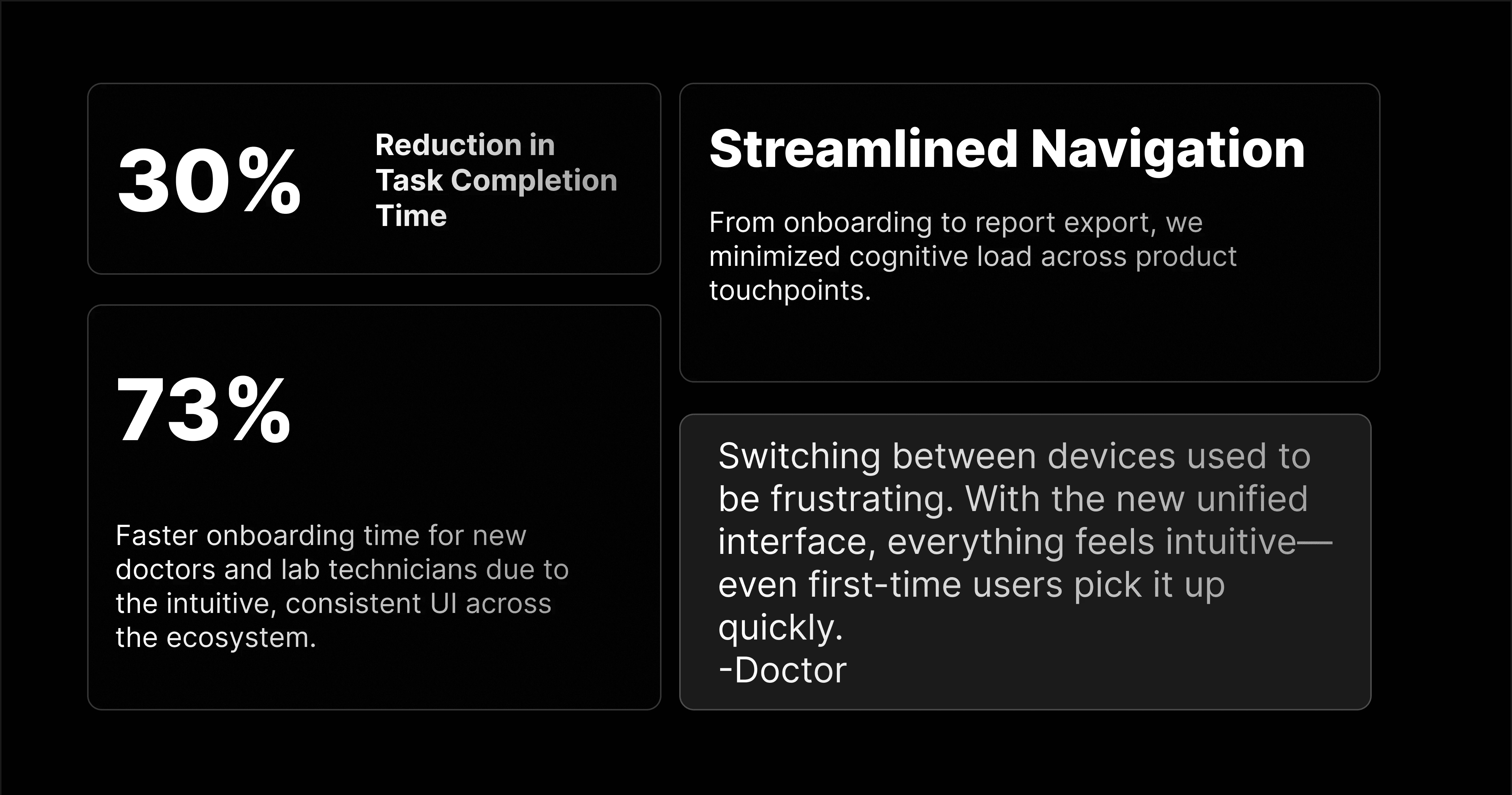
LEARNINGS
Content
Early field testing prevents late-stage friction
Involving real users throughout the design process helped refine terminology, navigation, and flows—ensuring smoother adoption in live environments.
Complexity for the system ≠ , complexity for the user
Even when logic is intricate, like in dynamic, dependency-based forms, users still expect clean, intuitive interfaces. Simplifying the surface is critical.
Role clarity improves both usability and security
Defining user roles not only streamlined the interface but also minimized errors and protected sensitive data.
⚠️ Heads up: Videos might load in lower quality by default. If things look a bit blurry, try bumping up the resolution manually for the best experience.
When dealing with histopathology or similar samples, doctors rely on modular, pre-existing forms tailored for different conditions. These forms guide the diagnostic process, ensuring consistency and clarity.
⚠️ Heads up: Videos might load in lower quality by default. If things look a bit blurry, try bumping up the resolution manually for the best experience.
For PBS (Peripheral Blood Smear) Cases AI-assisted cell analysis for precision reporting In PBS cases, doctors are supported by an AI-ML model that pre-processes the slide, identifies individual cell types, and presents insights for faster, evidence-backed diagnosis.
⚠️ Heads up: Videos might load in lower quality by default. If things look a bit blurry, try bumping up the resolution manually for the best experience.
Early field testing prevents late-stage friction
Involving real users throughout the design process helped refine terminology, navigation, and flows—ensuring smoother adoption in live environments.
Complexity for the system ≠ , complexity for the user
Even when logic is intricate, like in dynamic, dependency-based forms, users still expect clean, intuitive interfaces. Simplifying the surface is critical.
Role clarity improves both usability and security
Defining user roles not only streamlined the interface but also minimized errors and protected sensitive data.
LEARNINGS
Content
Early field testing prevents late-stage friction
Involving real users throughout the design process helped refine terminology, navigation, and flows—ensuring smoother adoption in live environments.
Complexity for the system ≠ , complexity for the user
Even when logic is intricate, like in dynamic, dependency-based forms, users still expect clean, intuitive interfaces. Simplifying the surface is critical.
Role clarity improves both usability and security
Defining user roles not only streamlined the interface but also minimized errors and protected sensitive data.
LEARNINGS
Content